[How To] How to set the desired microphone device as the default device when connecting an external monitor?
LastUpdate : Wed, 05 Nov 2025
Answer
When a laptop is connected to multiple microphone devices, such as an external monitor, you can select the microphone device you want to use in the sound settings page and set it as the default microphone device.
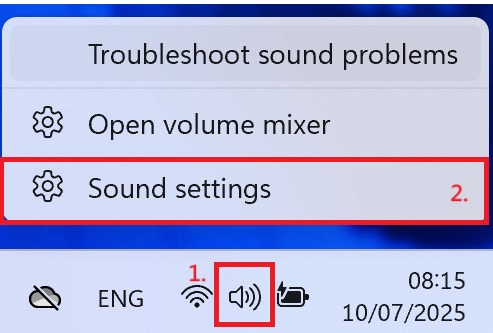
1. Right-click the speaker icon located in the notification area.
2. Select" Sound Settings".
3. Select "More Sound Settings".
 4. Click the recording device you want to use, and then click the "Set Default" button.
